Best Loom alternatives in 2026

Loom popularized async video at work - hit record, share a link, move on. After Atlassian acquired Loom in 2023, the product is still solid, but a lot of users have started shopping around. Reasons we hear most often: the free tier caps at 5-minute videos and 25 saved clips, the cheapest paid plan starts around $15 per user per month, and the polish of the recordings (no automatic zoom, basic cursor) feels stuck in 2020 compared to newer tools.
This guide walks through 7 Loom alternatives that have shown up most often in recent comparisons - including the open-source projects that have grown around this exact frustration, Mac-native recorders that prioritize visual polish, and B2B-focused options for sales teams. Each one has real strengths and real tradeoffs, listed honestly.
What to look for in a Loom alternative
Loom has three things going for it: instant recording, instant sharing via link, and decent quality on basic hardware. A good alternative should match those baselines and improve at least one. The criteria most people care about:
- Recording polish - automatic zoom into clicks, cursor highlighting, smooth motion. Loom records flat, which is fine for quick async messages but tiring to watch for tutorials.
- Pricing model - per-user subscription (Loom’s model), one-time purchase, or open-source self-host. Each has different tradeoffs.
- Platform - browser-based, Mac-native, Windows, Linux, or all of the above. Native apps generally produce higher quality recordings than browser-based tools.
- Sharing UX - one-click share links are the killer Loom feature. Some alternatives match it, others require manual upload.
- Editing depth - whether the tool stops at “record and share” or goes further with multi-clip editing, AI voiceover, captions, intro slides, etc.
The 7 tools below cover different combinations of these.
Loom alternatives compared
| Tool | Platform | Pricing | Auto zoom | AI features | Open source | Best for |
|---|---|---|---|---|---|---|
| Cap | Mac, Windows | Free OSS or ~$9/mo cloud | Yes (Studio mode) | No | Yes | Loom-style sharing without lock-in |
| Tella | Browser | Free or $19/mo | No | No | No | Founder demos and async presentations |
| Screen Studio | Mac | ~$29/mo subscription | Yes | No | No | Mac creators paying for polished output |
| Tight Studio | Mac (Apple Silicon) | Free with watermark, $6/mo Starter, $16/mo Pro | Yes | Yes (voiceover, captions) | No | Mac creators who want AI polish at lower cost |
| CleanShot X | Mac | $29 one-time, optional cloud | No | No | No | Mac users who already use it for screenshots |
| Vidyard | Web, Mac, Windows | Free or from $19/mo | No | Limited | No | Sales reps and revenue teams |
| OBS Studio | Mac, Windows, Linux | Free | No | No | Yes | Power users who want full control for free |
Cap - the open-source Loom alternative
Cap has emerged as the highest-profile open-source Loom alternative. It is a Mac and Windows app with two modes: Instant mode for quick share-link recordings (Loom-style) and Studio mode for higher quality recordings with automatic zoom and cursor effects.
Strengths: Genuinely open source under AGPL, so you can self-host or audit the code. The Studio mode produces noticeably more polished output than Loom. Active development and a vocal community.
Tradeoffs: Younger product, so feature depth in editing is still catching up to mature tools. Cloud features (sharing links, transcription) are paid even though the recorder itself is free.
Cap is the most direct ideological alternative to Loom - same workflow, same share-link mental model, but without the per-seat subscription lock-in.
Tella - browser-based for presentations
Tella takes a different approach: it runs entirely in the browser and adds presentation-style backgrounds to your recordings. Multi-clip recording is built in, so you can stitch together a polished demo without external editing.
Strengths: No install, beautiful default styling, strong for founder demos and async presentations where the visual frame matters.
Tradeoffs: Browser-based recording has hard limits compared to native apps - higher CPU use, occasional dropped frames, no system audio capture on most browsers. The free tier is restrictive.
Tella is best if you want a presentation feel without learning a video editor and you do not mind the browser tradeoffs.
Screen Studio - the Mac premium option
Screen Studio is the tool most often mentioned alongside Tight Studio in the Mac creator world. It pioneered the automatic zoom-into-clicks pattern that newer Mac recorders have all adopted.
Strengths: Highly polished recordings with minimal effort. Automatic zoom is excellent. Strong cursor styling. Popular among Mac developers and YouTubers for product demos.
Tradeoffs: Mac-only and recently moved to a $29/month subscription, which is a meaningful jump from its earlier one-time pricing. No AI narration or voiceover. Editing is good but not as deep as a full video editor.
Screen Studio is the right pick if you want the most established polished-output Mac recorder and the subscription does not bother you.
Tight Studio - Mac-native polish with AI features
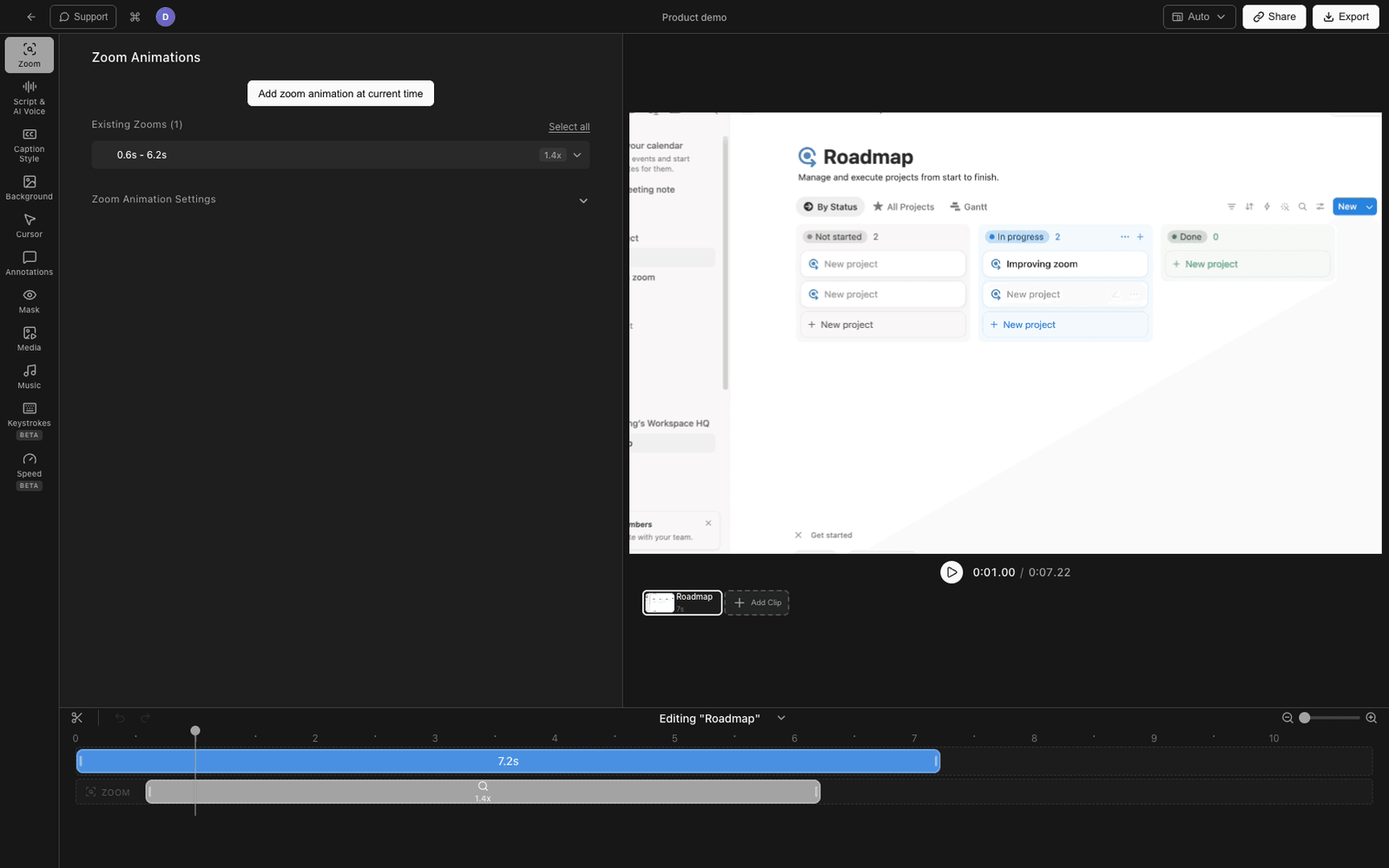
Tight Studio is what we make. We built it because we wanted Screen Studio’s polish on top of a fuller editor, plus AI features for narration and visual generation, at a more accessible price.
Strengths: Smart auto-zoom, animated cursor with click effects, AI voiceover (text-to-speech with multiple voice options), AI-generated intro and outro slides, multi-clip recording, captions with styled presets, royalty-free music library, text and media overlays. Free tier is unlimited (with watermark), Starter is $6/month yearly, Pro is $16/month yearly.
Tradeoffs: Mac-only and currently Apple Silicon only. No system/internal audio capture (microphone audio only). Younger product than Screen Studio, so some workflows are still rough around the edges.
Tight Studio is most useful if you want the polished-recording experience plus AI features (voiceover, captions, generated visuals) without paying $29/month.
CleanShot X - if you already use it for screenshots
CleanShot X is primarily a screenshot tool with screen recording added. If you already use it for screenshots and annotations, the recording feature is a fine bonus.
Strengths: Excellent screenshot workflow, GIF export, light recording capability, instant cloud sharing via Cleanshot Cloud. One-time pricing of $29 plus optional cloud subscription.
Tradeoffs: Not designed for long-form recording or polished tutorials. No automatic zoom, no multi-clip editing, no AI features. The recording mode feels like an add-on rather than the primary feature.
CleanShot X is the right pick if your needs are dominated by screenshots and short utility recordings, not tutorial production.
Vidyard - Loom for B2B sales
Vidyard targets sales reps and revenue teams specifically. Where Loom is generic async video, Vidyard is purpose-built for prospecting, account management, and customer success workflows.
Strengths: CRM integrations (Salesforce, HubSpot, Outreach), per-viewer analytics, virtual backgrounds, calendar embeds, and account-based view tracking. Free tier available.
Tradeoffs: Pricing scales quickly past Loom for teams that want analytics features. Not a fit for tutorials, marketing content, or non-sales workflows.
Vidyard is the right pick when async video is part of a B2B sales motion and you need engagement data tied back to your CRM.
OBS Studio - free, open source, infinite control
OBS Studio is the free, open-source recorder that streamers use. It runs on Mac, Windows, and Linux and has no limits on recording length, file size, or features.
Strengths: Free forever, infinite control over scenes, sources, audio routing, and codecs. Cross-platform. Active community and plugin ecosystem.
Tradeoffs: Steep learning curve. No built-in editor. No automatic zoom, cursor effects, or polish features. You record raw footage and edit elsewhere. Sharing requires manual upload.
OBS is the right pick if you are technically comfortable, want maximum control, and are willing to do post-production in a separate tool.
How to choose
Quick decision guide:
- You want open source and a Loom-like workflow: Cap.
- You want maximum control for free and do not mind editing in another tool: OBS.
- You are a Mac creator and want the most polished output money can buy: Screen Studio.
- You are a Mac creator and want AI features at a lower price: Tight Studio.
- You want a browser-based presentation feel: Tella.
- You are a B2B sales rep: Vidyard.
- You already use CleanShot X for screenshots and need light recording: CleanShot X.
Most teams end up picking one tool for personal recordings and a second for shared workflows. There is no single winner here - the right answer depends on your operating system, your budget, and whether your recordings are mostly throwaway async messages or polished content meant to be watched many times.
Frequently asked questions
What is the best free Loom alternative?
For unlimited free use with a Loom-style share-link workflow, Cap is the closest match - it is genuinely open source and works on Mac and Windows. For maximum control without paying anything, OBS Studio is the most powerful free option, though it requires more technical setup. Tight Studio also has an unlimited free tier with a watermark, which is a fit if you want the polished recording features without paying initially.
Is there an open-source alternative to Loom?
Yes. Cap is the most prominent, with Studio mode for polished recording and Instant mode for quick share-link videos. Snapify is another smaller open-source project in the same space. OBS Studio is open source but works differently - it is a recorder, not a share-link tool, so you would need to upload videos separately.
Is Loom worth paying for?
Loom is solid for async team communication where you need a low-friction record-and-share workflow and AI summaries are useful. It is less compelling if you are creating tutorials or product demos, since it does not offer automatic zoom or polished output. The pricing comparison depends on team size - Loom Business is $15 per user per month, which adds up for larger teams. For individuals or small teams making polished content, Mac-native tools like Tight Studio or Screen Studio give you better recordings for less.
Can I record longer than 5 minutes for free with Loom?
The free Loom plan caps recordings at 5 minutes and 25 saved videos. To remove that limit, you need the Business plan at $15 per user per month. If unlimited recording length matters, Tight Studio (free with watermark), Cap (open source), and OBS (free) all let you record without time limits at no cost.
Is there a Mac-native Loom alternative?
Several. Screen Studio and Tight Studio are both Mac-native and produce noticeably more polished output than Loom because they capture at higher quality and add automatic zoom. CleanShot X is Mac-native if your needs are mostly screenshots with light recording. Cap also has a Mac native app alongside Windows.
Does any Loom alternative offer one-time pricing?
CleanShot X is the only one in this list with traditional one-time pricing ($29 for the app plus optional cloud subscription). Most others have shifted to subscription models. OBS is free forever. Cap and Tight Studio both have free tiers that let you use the recorder without a subscription, though paid features sit behind monthly plans.